
Invoice2go makes it easy for any small business to create and send a professional invoice. We are the ideal solution for all types of businesses— from carpenters to dog walkers, web designers to architects. Creating, organizing and sending invoices doesn’t need to be painful or time consuming. Here’s how the app works:
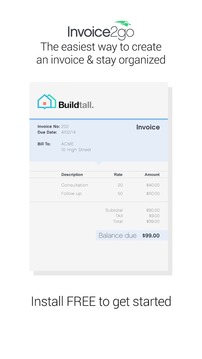
Choose from one of more than 20 invoice templates. Customize your invoice with a current business logo or use our tool to design a new one. We’ve spoken with business owners who use Invoice2go and most of them agree that sending out a professional invoice this easily feels almost as good as getting paid. (Almost.)
Create your first invoice on your Android Phone or Tablet. Once you’re ready, email the invoice directly to your customer for payment.
Or, draw up an estimate. Include a description of your business products or services, along with predicted rates and times. You can also customize your estimate to match the needs of a specific customer.
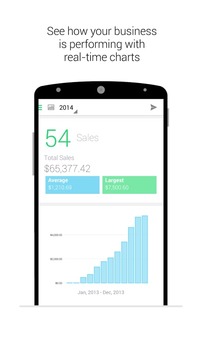
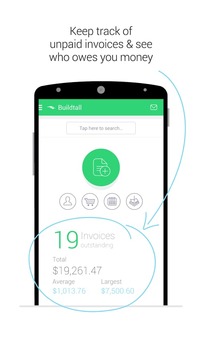
We’ll keep you organized. No more paper or file folders. After an estimate or an invoice is sent, it will automatically go into a designated folder as you await payment. You’ll always have everything you need for weekly, monthly or yearly accounting.
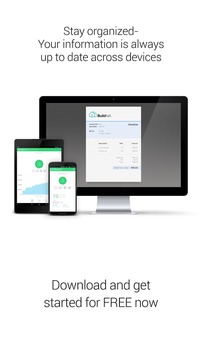
Stay connected on all of your devices. Invoice2go utilizes cloud technology to sync your accounts continuously. For example, if you send an invoice from your phone, it will also be available on your tablet and in the web app.
Send out reminders. Keep your customers updated as often as you like. Add PayPal buttons to your invoice to ensure you’ll receive payment even faster.
Some key features include:
Receipts: Skip shoebox accounting. Instead, save photos of your receipts and generate expense reports for your accountant or customers.
Document Signing: Turn off your printer. Now your customers can sign documents on your tablet or mobile phone.
Statements: Send your customers a full update of their accounts, including paid and unpaid invoices.
Calendars: Add time entries for jobs and then upload them to your documents.
Maps: Insert location information into documents and see where your sales get the most attention.
Scanning: Add barcodes and QR codes to invoices with ease by simply scanning the information you need.
Ready to get started? Download the app today. You can create up to three free professional invoices. If you like what you see, you can select a plan that offers even more for your business.
Invoice2go ,很容易让任何小型企业创建和发送专业发票。我们为各类businesses-从木匠到遛狗,网页设计师建筑师的理想解决方案。创建,组织和发送发票不需要是痛苦或费时。以下是应用程序的工作原理:
选择从超过20发票模板之一。自定义您的发票与当前的业务标识或使用我们的工具来设计一个新的。我们已经谈过,谁使用Invoice2go且大多同意派出一个专业发票这很容易感觉几乎一样好得到报酬的企业主。 (几乎)。
在你的Android手机或平板电脑创建您的第一张发票。一旦你准备好了,直接发送电子邮件发票给客户付款。
或,得出了一个估计。包括您的企业的产品或服务的描述,以及预测利率和时间。您还可以自定义你的估计,以匹配特定客户的需求。
我们会与你保持组织。没有更多的纸张或文件夹。经过估算或发票发出后,它会自动进入一个指定的文件夹为你等待付款。你永远有你需要每周,每月或每年的会计一切。
保持连接的所有设备。 Invoice2go利用云计算技术,不断同步您的帐户。例如,如果您从您的手机发送发票,这也将是适用于平板电脑和Web应用程序。
发送了提醒。让您的客户像你一样经常更新。贝宝添加按钮,您的发票,以确保你会更快收到付款。
的一些关键特性包括:
收据:跳过鞋盒核算。相反,将照片保存的发票,并为你的会计师或客户的开支报告。
文档签名:关闭打印机。现在,您的客户可以登录您的平板电脑或手机上的文件。
说明:发送您的客户自己的账户完全更新,包括有偿和无偿的发票。
日历:添加时间项作业,然后将它们上传到您的文档。
图:的插入位置信息到文档中,看看你的销售得到了最多的关注。
扫描:添加条形码和二维码的发票轻松通过简单的扫描你所需要的信息。
准备好开始?下载的应用程序今天。您最多可以创建三个免费的专业发票。如果你喜欢你所看到的,你可以选择一个计划,提供了更多为您的企业。
以上就是账务助手Invoice2go的全部内容了,想要了解更多账务助手Invoice2go相关资讯,敬请关注游戏爱好者站,超多有趣内容等你来看!